I was today days old when I realized Google Trends has a real-time tab that almost nobody clicks. Open trends.google.com/trending and you’ll see what every American is searching for right now — ranked by volume, status-flagged Active or Lasted, filterable by category, sliceable by the past 4 hours, 24 hours, 48 hours, or 7 days. Each trend has a velocity readout, a breakdown of the queries driving it, and the news stories behind it. Free. No login. Exports to CSV and RSS. The thing news producers and marketers live in, that nobody else seems to have heard of.
What it is:
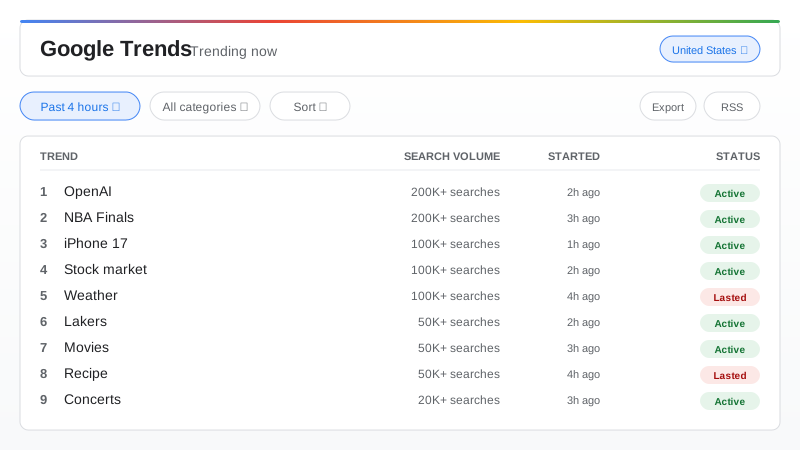
Trending Now is a tab inside Google Trends. It is not the Year-in-Search retrospective and it is not the side-by-side comparison tool with the graph — it is its own live view. Open it and you get a ranked list of what people in your selected country are Googling right at this moment. Each row shows the trend name, an estimated search-volume bucket (20K+, 50K+, 100K+, 200K+, 1M+), when the trend started, a status badge of either Active (still climbing or elevated) or Lasted (past spike now falling back toward baseline), and a small toggle for elapsed-vs-clock time. At the top of the page, a single timeframe pill lets you switch between the past 4 hours, the past 24 hours, the past 48 hours, and the past 7 days. A category dropdown lets you narrow the list to one of roughly seventeen verticals — Technology, Sports, Entertainment, Politics, Health, Business, Climate, and on down. Sort by title, search volume, recency, or relevance. Click any trend and a panel opens with the related queries driving it and the news stories Google has pinned to it.
Why it’s a “today days old” hit:
Almost everyone has heard of Google Trends. They’ve seen the Year-in-Search retrospective video. They’ve maybe even used the comparison tool to settle an argument about whether “pop” or “soda” wins in their state. Very few have ever clicked the Trending Now tab specifically. Google relaunched it on August 14, 2024 with a refreshed “Trending Now experience” that expanded coverage to 100+ countries, faster updates, and the time-window filters — and most people still don’t know it exists. Inside the building, this is the tab news producers and marketers live in. Outside the building, it is the textbook “today days old when…” surprise: a free, real-time, fully featured trending dashboard from Google itself, sitting one URL away from a homepage everyone has bookmarked for a decade.
What you can actually do with it:
Filter by category to slice the noise — pop Technology if you want to see what device launch or AI announcement is breaking right now; pop Sports if you want to know which team or athlete the country is talking about between innings; pop Entertainment for the show or trailer; pop Politics, Health, Business, or Climate when those are the lens you want. Watch the Active vs Lasted toggle to tell “still happening” from “peaked an hour ago.” Click into a trend and Google shows you both the related queries driving it (the actual phrases people are typing) and the news stories it’s associated with — useful when a one-word trend like “weather” or “blackout” could mean any of ten things. Concrete users: news desks priorizing what to cover, social media managers timing posts, SEO researchers spotting breakouts before the keyword tools update, marketers feeling out demand, and finance and macro people watching real-world sentiment leak into search. Need it in a spreadsheet? Hit Export and pull a CSV. Want it pushed to you? Subscribe to the RSS feed for the country and category you care about. None of this requires an account.
The pair with yesterday’s post:
If you read yesterday’s post on Trends24, you already have the X (Twitter) trends side covered — what people are posting about right now. Trending Now is the other half of the picture — what people are searching for right now. Together they answer the same question (“what is America paying attention to at this exact moment?”) from two complementary angles, and the overlap is smaller than you’d guess. A breaking news story usually hits search before it hits X; a meme or celebrity moment usually hits X before it hits search. Open both tabs and you have the complete real-time attention dashboard, free, no logins.
How to start (one URL):
Go to trends.google.com/trending?geo=US for the US view, or just trends.google.com/trending and let it auto-detect your country. Swap the geo parameter for any of the 100+ countries Google now covers. Set the time window. Pick a category if you want. No login, no install, no signup. It’s been sitting there the whole time.